
Your AI Leaves the Storefront
Customers don't just ask questions on product pages. They reply to an Instagram story, message your Facebook Page, or reach out on WhatsApp. In a lot of markets, that's just how people talk to businesses.
So we're bringing social channels to your Shopify AI chatbot: Instagram, WhatsApp and Facebook Messenger. Same AI, same store knowledge, same brand voice, now showing up where your customers already are.
Getting Access
We're rolling this out in phases so we can keep a close eye on each account as we enable it.
If you don't have access yet, open the Flyweight AI app, go to Setup → Channels and hit Apply to join the Beta. Tell us which channels you're after and we'll get back to you. One heads-up: it can take up to two weeks, because the first application round filled up fast. 🙌
The rollout order we're currently planning:
- WhatsApp and Instagram
- Ticket AI
- Facebook Messenger
👉 More on the bigger picture: one on-brand AI for every channel.
First: Set Up Your Meta Business Manager
For WhatsApp and Messenger, everything starts with a Meta Business Manager account (Meta also calls it your business portfolio). Instagram can connect without it, as you'll see below, but we still recommend it.
In short, it's Meta's admin hub for your business assets. Your Facebook Page, Instagram account, WhatsApp number, ad accounts, and the permissions that control who and what can use them.
That permissions layer is why it matters here. Once your channels live in Business Manager, you can grant access to tools like ours from one place instead of connecting each app one by one.
Log in or create your account at business.facebook.com.
Then connect the channels you want to use, and they'll show up as selectable inside the Flyweight AI app.
Instagram works a bit differently from the other two.
We support the new Instagram API, which lets you connect directly through Instagram login. No workaround through a Facebook Page. Just authorise your Instagram professional account and you're set.
That said, we still recommend adding your Instagram account to Business Manager. It keeps everything in one place, makes permissions easier to manage, and lets you set up conversation routing, more on that in a second.
Troubleshooting: The AI Isn't Replying
Almost every quiet Instagram inbox comes down to one of these two things.
1. Another app has the conversation.
Meta decides which connected app receives a DM. If nothing is assigned, or another tool has priority, the messages won't reach your AI. Sometimes Meta keeps them for itself.
The fix is quick: set Flyweight AI as your default routing app. We put together a short walkthrough here 👉 Meta conversation routing, step by step.
2. Instagram's own message setting is off.
If the AI doesn't reply within about 30 seconds, check the setting in the Instagram mobile app. Open Settings and activity, go to Messages and story replies, then under Message requests make sure Allow access to messages is turned on.
If that setting is off, no connected tool can see your DMs, even if the rest of your setup is correct.
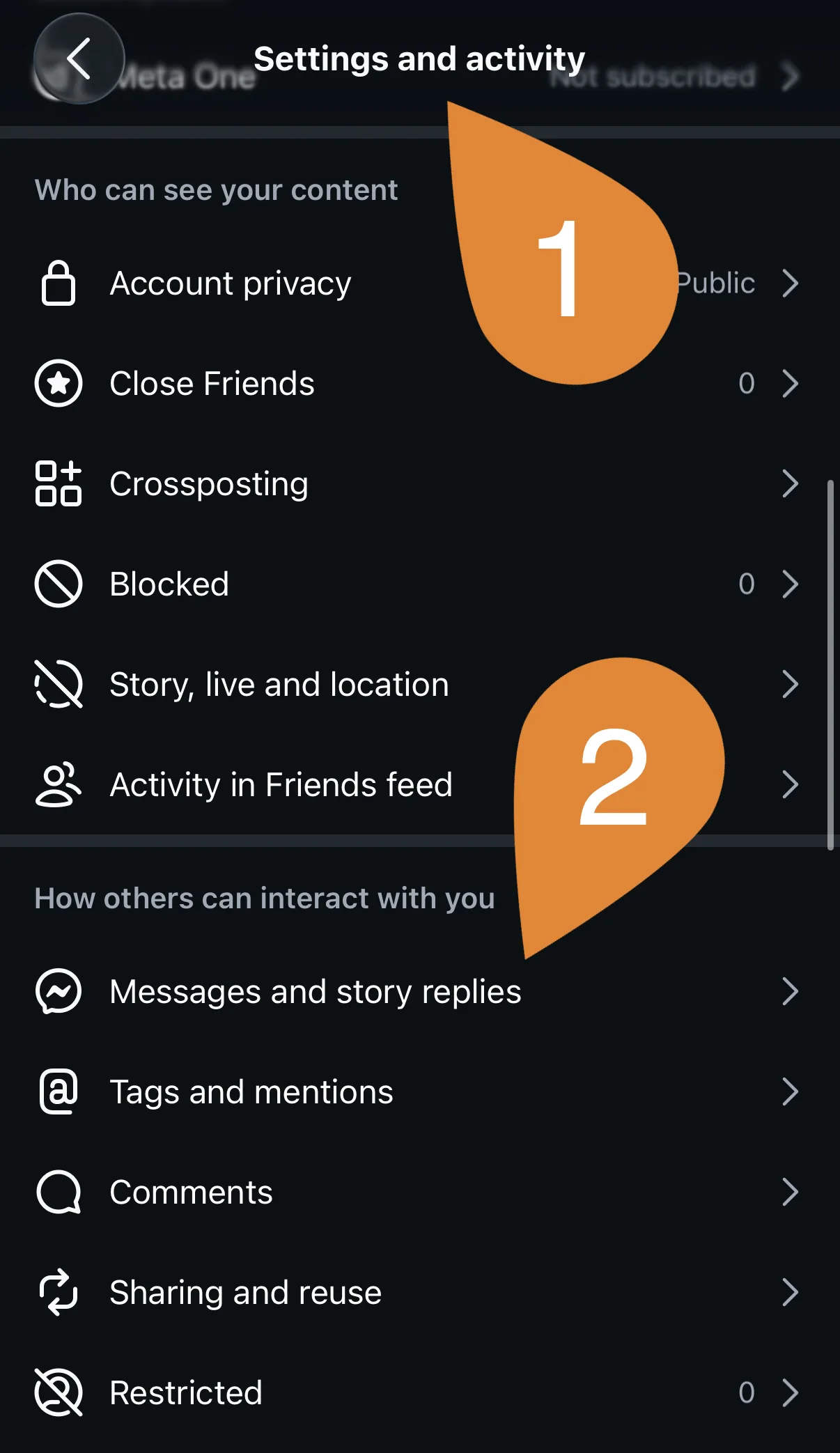
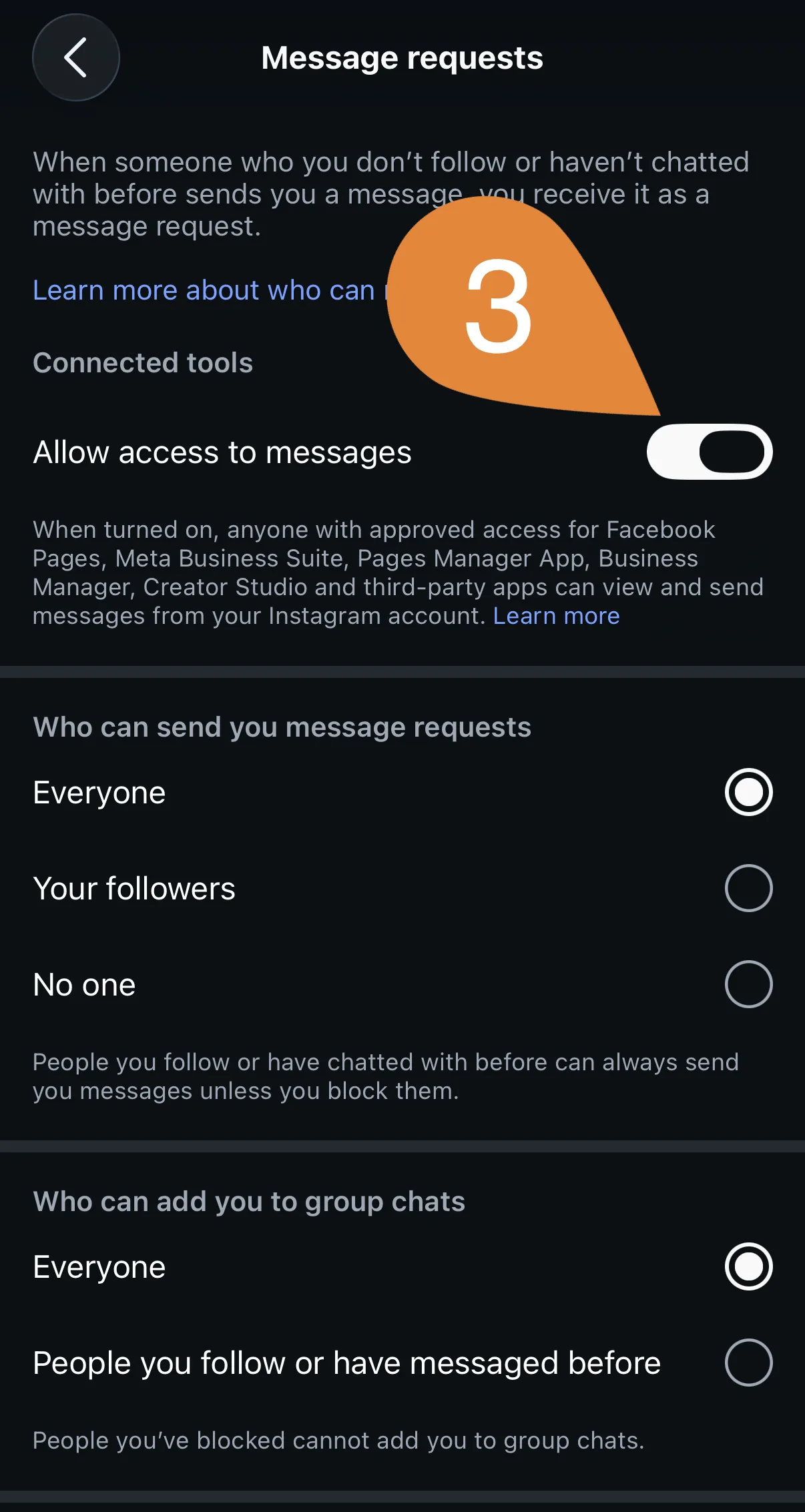
Steps 1 and 2 are in the first screenshot, step 3 in the second.
WhatsApp takes a bit more setup than the other channels, mostly because of how phone numbers are handled.
What You Need
A Meta Business Account with your business details filled in. Meta checks who you are before allowing you to message customers at scale, so complete your business info first. Half-finished profiles are the most common reason a WhatsApp setup gets stuck.
A phone number that isn't already on WhatsApp. This is the one that trips people up. The number you connect can't already be in use with the regular WhatsApp app, WhatsApp Business, or another messaging platform. It needs to be a real number that can receive a call or SMS for verification, and it has to belong to you.
The Easiest Option: A Virtual Display Number
Start here. When you connect, Meta lets you pick "Use a different display number" and register a virtual number as your WhatsApp display number. It's free, and it goes live after a short Meta verification. For most stores that's the whole story, no number to buy and nothing to reuse from your team.
No Virtual Number? Get a Dedicated One
If a virtual number isn't an option for you, get a dedicated number for your AI instead of reusing the one your team already works from. You can get one from your telecom provider or a digital number service.
Your Business Number* offers numbers from the UK, US, Canada, Australia, and Brazil. We're a German startup and tried a few providers ourselves; we settled on a UK number from Your Business Number, and it was by far the easiest one to get working with WhatsApp.
*Affiliate link. We're working on a discount for merchants.
Why We Connect via the Cloud API
We connect WhatsApp through Meta's Cloud API, using the Facebook for Business connector. We think that's the right setup, and here's why it matters:
Your WhatsApp Business Account stays yours. It lives in your Business Manager and stays owned by your business. You control your channels and decide which apps get access, including ours. If you ever switch tools, you're not stuck with a middleman controlling your number.
Customer-initiated conversations keep it simple. When a customer messages you first, Meta opens a 24-hour service window and your AI answers inside it. That's the everyday case: someone reaches out with a question, your AI replies, no template approval needed.
What Meta Charges (and What Changes in October)
Worth knowing before you plan a budget, because Meta is mid-shift here.
Since July 2025, Meta bills per message rather than per conversation. Right now, the service replies your AI sends inside that 24-hour window are not charged.
That changes on 1 October 2026. From then, Meta charges per message for service messages sent inside the window, at the same market-based rates it already applies to utility and authentication templates. Utility templates sent inside an open window start being charged again on the same date.
A few things that don't change:
- The 24-hour window still opens and resets every time a customer messages you
- If someone reaches you from a Click-to-WhatsApp ad, you get a 72-hour window that stays free
- Outside the window you still need a template to re-engage someone
Rates depend on the country you're messaging, so check Meta's pricing page for your markets rather than trusting a number from a blog post (including ours 😄).
Marketing works differently. Proactive campaigns to your WhatsApp contacts use approved message templates, and Meta bills those per message. That's on our roadmap rather than something you can do today, and we'll be clear about the cost model when it lands.
👋 Facebook Messenger
Simplest one to connect, last one in the rollout queue.
Once your Facebook Page is connected to your Business Manager, you can connect it directly from the button in the Flyweight AI app. That's it. You grant one Page for messaging in the Meta dialog, so pick the one your customers actually write to.
If messages don't come through, it's usually the same issue as Instagram: conversation routing. Set Flyweight AI as the default routing app for your Page and you should be good 👉 here's how.
Quick Recap
| Channel | What you need | Watch out for |
|---|---|---|
| Instagram professional account, direct Instagram login | Conversation routing, "Allow access to messages" | |
| Business Manager with business info, plus a number: a free virtual display number or a spare phone number | The number must not be on WhatsApp already | |
| Messenger | Facebook Page in Business Manager | Conversation routing |
A Few Things Worth Knowing
Your AI replies, it doesn't cold-message. On social channels the AI answers customers who wrote to you. It doesn't start conversations out of the blue.
It says what it is. On Instagram, WhatsApp and Messenger the AI introduces itself as your store's AI assistant when it picks up a new topic. That keeps you on the right side of the EU AI Act, and customers tend to appreciate the honesty anyway.
One thread per customer. Your customer sees a single continuous conversation in their app, exactly like messaging a friend, so the context carries over between questions.
Your team can step in. Take over any conversation whenever you want. On Instagram and Messenger you have a generous window to come back to someone after their last message, so a reply the next morning still reaches them.
One AI, More Places to Answer
The best part: this isn't a new chatbot to train. It's the same AI, grounded in the same store knowledge, keeping the same voice, now answering in more places.
Ready to go social? Head to Setup → Channels in the app and hit Apply to join the Beta, and we'll help get you connected 🚀

 Ice Barrel
 STAY SPICED !
 Australian Bodycare
 Pullup & Dip
 Venen Engel
 VEYNOU