Live Order Status
Real-time tracking for happier customers
Order Tracking Feature: Live Order Status for Shopify Stores
Meet customer expectations with a Shopify chatbot for tracking orders, built for modern Shopify stores. Give shoppers live order status updates instantly, build trust after purchase, and make support a lot lighter for your team. It’s a simple way to give customers the convenience they expect and your team the breathing room they need.
Introduction
Whether you're a fast-growing DTC brand or a more established ecommerce business, great order tracking is now table stakes. Customers expect transparency. They want to track orders in real time, on their own schedule, without opening a support ticket. A Shopify chatbot for tracking orders makes that easy by putting shipping and order details directly in front of customers, 24/7.
Why Order Tracking Matters
Order tracking is one of the easiest ways to build trust and reduce support volume in your Shopify store. When customers can quickly check their Shopify order status, they feel informed from checkout to delivery. Without it, support teams get buried in repetitive questions, response times slow down, and customer satisfaction takes a hit.
Customer Expectations
- 90% of consumers want to track their orders online.
- Repetitive "Where is my order?" (WISMO) questions can flood support queues and slow down your team.
The Competitive Edge
Brands using a Shopify order status chatbot across their site and support channels create a smoother experience. Customers can track order Shopify details anytime, without waiting for a reply or escalating to support.
How the Feature Works Step by Step
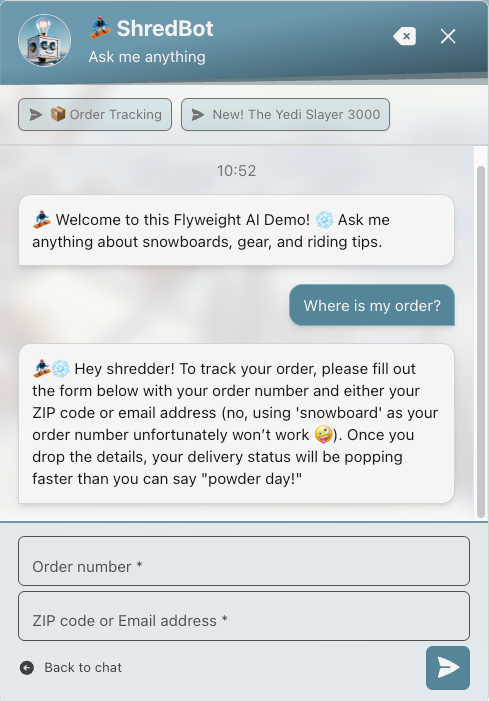
Our Live Order Status chatbot connects directly to your Shopify store and returns live order updates in real time. Here’s how it works for both your customers and your team:
Step 1: Customer Initiates Request
In your store’s chatbot widget, the customer enters their order number plus the email address or ZIP code used at checkout.
Step 2: Instant Data Verification
The chatbot securely checks those details against your Shopify orders, so access stays limited to the right customer.
Step 3: Live Order Status Delivery
Within seconds, the Shopify chatbot for tracking orders shows the current status: processing, shipped, out for delivery, delivered, or any custom status you’ve set up in your store.
Step 4: Proactive Updates and Tracking Links
Customers can also see tracking numbers, estimated delivery dates, and courier links for live shipment tracking.
Step 5: Smart Fallbacks
If the order number or customer details don’t match, the Shopify order status chatbot can trigger fallback rules, like asking the customer to try again or routing them to live support. You stay in control of the flow.
Add Order Details with Timeline Comments or a Metafield
Give the AI the order details your customers need, including information from an external system. Timeline comments and the flyweight_content order metafield are read live when a customer asks about their order, so the AI can include the latest saved details in its response without waiting for the 24-hour content refresh.
- Timeline comments: Add a comment starting with
#flyweightto the order’s Timeline in Shopify. - Order metafield: Create a definition once for Orders in Shopify’s metafield settings. Use namespace
custom, keyflyweight_content(full identifier:custom.flyweight_content), and type Multi-line text. No#flyweighttag is needed in this field.
Populate the metafield manually or from your external system with the estimated ship date, current order status, delay reasons, or other information you want to share with the customer. Keep it to 1,000 characters per order, the amount Flyweight reads. Keep the value up to date in Shopify so the AI has the latest information when the customer asks.
Benefits for Merchants and Customers
For Merchants
- Reduce Support Volume: Cut down repetitive WISMO tickets by automating order status requests.
- Boost Team Productivity: Give your support team more time for higher-value conversations.
- Customizable Rules: Adjust fallback flows and responses to fit your Shopify workflows.
- Detailed Analytics: See trends in order tracking requests, busy periods, and customer behavior.
For Customers
- 24/7 Self-Service: Track order Shopify updates anytime, without sending an email or waiting for support.
- Privacy and Security: Customers only see secure status updates, without exposing sensitive data.
- Instant Peace of Mind: Real-time answers reduce uncertainty and help build loyalty.
Configurations & Fallback Rules
Setting up your order tracking chatbot is straightforward and flexible:
- Authentication: Choose which fields are required for verification, like order number plus email or ZIP code.
- Status Messaging: Customize the message shown at each stage, whether the order is pre-fulfillment, shipped, or delayed.
- Fallback Rules: Build step-by-step flows for when an order isn’t found: ask the customer to retry, offer another lookup method, or connect them to a live agent.
- Integrations: Works smoothly with your other Shopify apps and automation tools.
For a guided walkthrough and hands-on help, feel free to Book a Demo with our team!
FAQ
How does the Order Tracking feature work?
The customer enters their order number and ZIP code or email, and instantly gets their order status back, without waiting or needing a manual lookup.
What happens if no order is found?
You can set custom fallback rules, like asking the customer to try again or automatically routing them to your support team for extra help.
Conclusion
Give customers the post-purchase transparency they expect and take repetitive support work off your team’s plate with a Shopify chatbot for tracking orders. Live Order Status is quick to set up, secure, and flexible enough to fit different Shopify workflows. It’s a simple way to handle Shopify order status questions at scale.

 Ice Barrel
 STAY SPICED !
 Australian Bodycare
 Pullup & Dip
 Venen Engel
 VEYNOU