Flyweight AI Chatbot for Shopify now with Order Tracking in Chat
Learn how to enable real-time order tracking directly in your Shopify store chat with the Flyweight AI Chatbot. Reduce support inquiries and provide instant order status updates to your customers.


One of the most common questions in ecommerce: Where is my package?
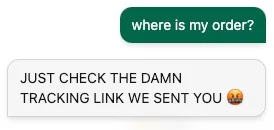
Here’s what we’ve learned: customers want fast, complete updates on their order status, without digging through old emails. And as a store owner, you probably don’t want to answer those questions by hand.
That’s why we built this: a GDPR-compliant all-in-one order tracking experience, right inside the chat.
When a customer asks about their order status, for example, "has the package been shipped yet?", the AI picks up the intent, knows an order status lookup makes sense, and shows the form:
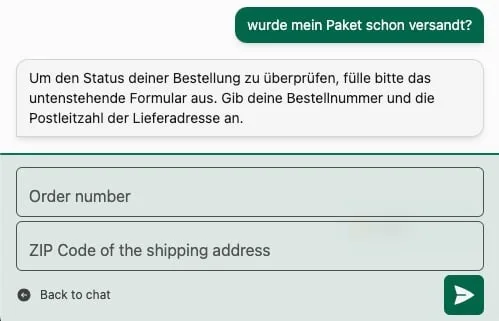
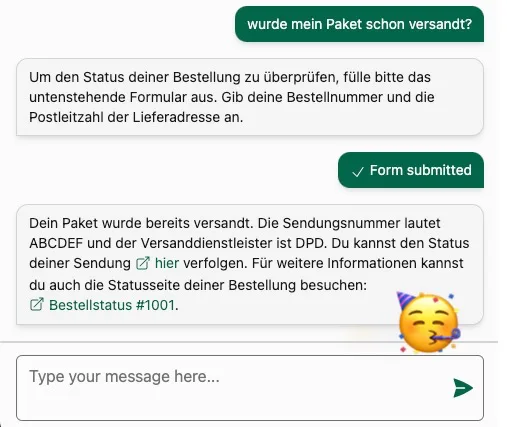
Once the customer enters their details correctly, the chat pulls the current order data and displays it in a clean, easy-to-read format. Order number input is flexible, with or without prefix or suffix. For example, entering 1001 returns the same result as #1001.
Nice. How do we turn on order tracking?
Not using our AI chatbot yet? Just install the order status chatbot for Shopify. Order tracking is enabled by default ✅
Already using our AI chatbot? Then it takes just a few clicks:
- Open the Flyweight Assistant App in your Shopify account.
- Accept the new access permissions. We still do not read personal or order data, but we need these permissions to send a targeted request with the ZIP code and order number to the Shopify API.
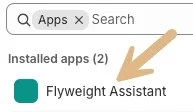
- In the app, go to Routings and enable order tracking.
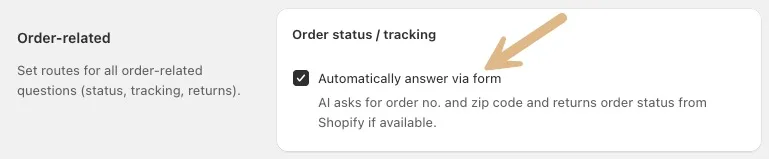
- Save, and you're done ✅
Important: Order tracking only works for orders placed within the last 60 days.
Want to fully automate your "where is my order" process for Shopify? Check out our full guide.
Automatic shipment tracking with the intelligent Shopify assistant ✌️

 Ice Barrel
 STAY SPICED !
 Australian Bodycare
 Pullup & Dip
 Venen Engel
 VEYNOU