How to Exclude Knowledge from Your Shopify Chatbot
Learn how to exclude content from your Shopify chatbot. Discover how to use HTML comments or the flyweight-ignore tag to remove knowledge from your Flyweight AI Chat Assistant and Agent.

Optimize Your Shopify Chatbot with AI: How to Exclude Content
In the last article, we covered how to add extra knowledge to your AI Chatbot for Shopify. This time, we're doing the reverse: how to exclude content from your Flyweight AI Assistant.
If you want your Shopify Chatbot to answer with the right context, it helps to leave certain content out on purpose. In this guide, we'll walk through two simple ways to remove content from Flyweight AI's knowledge base.
The key tools at a glance:
<!--flyweight:ignore-->→ HTML comment for pages, blogs, FAQsflyweight-ignore→ tag for products
This matters most when content:
- isn't meant for customers
- is outdated
- is no longer being sold
- shouldn't be used by the AI agent
How Flyweight AI Processes Content
Flyweight AI automatically reads all public content from your Shopify store, including:
- Product pages
- Pages
- FAQs
- Blog articles
- Other HTML content
All data is refreshed every 24 hours.
So if you add or remove content, the change will take effect after the next 24-hour refresh.
1. Exclude Content via HTML Comment
The most flexible option is the Flyweight Ignore HTML comment:
<!--flyweight:ignore-->
Add this comment at the very top of a page's HTML, and you're done.
This works for any HTML-based content, including:
- Product pages
- Pages (FAQ, etc.)
- Blog articles
How to Do It
- Open the page you want to exclude, like an FAQ page
- Click "Show HTML"
- Add the following comment at the very top of the code:
<!--flyweight:ignore-->
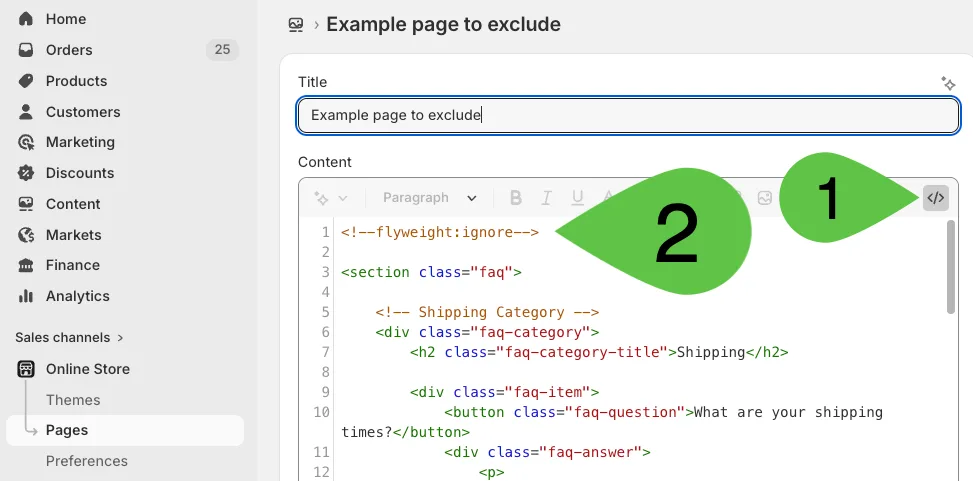
- Save the page
On the next 24-hour refresh, that page will be removed from the AI backend. The AI chatbot will stop using it for answers and recommendations.
When Is This Method Useful?
- When you want to exclude an entire page
- When content should be turned off temporarily
- When internal information was accidentally published
- When you want to remove seasonal content from the AI chat
👉 This gives you maximum control at the HTML level.
2. Exclude Products via Tag (ideal for many products)
For products, there's an even easier option: the flyweight-ignore tag.
Add the
flyweight-ignoretag to the product, and you're done.
This is especially useful if you:
- want to exclude a lot of products at once
- use CSV uploads
- apply tags automatically
How to Do It
- Open the product in Shopify
- Go to the Tags section
- Add this tag:
flyweight-ignore - Save the product
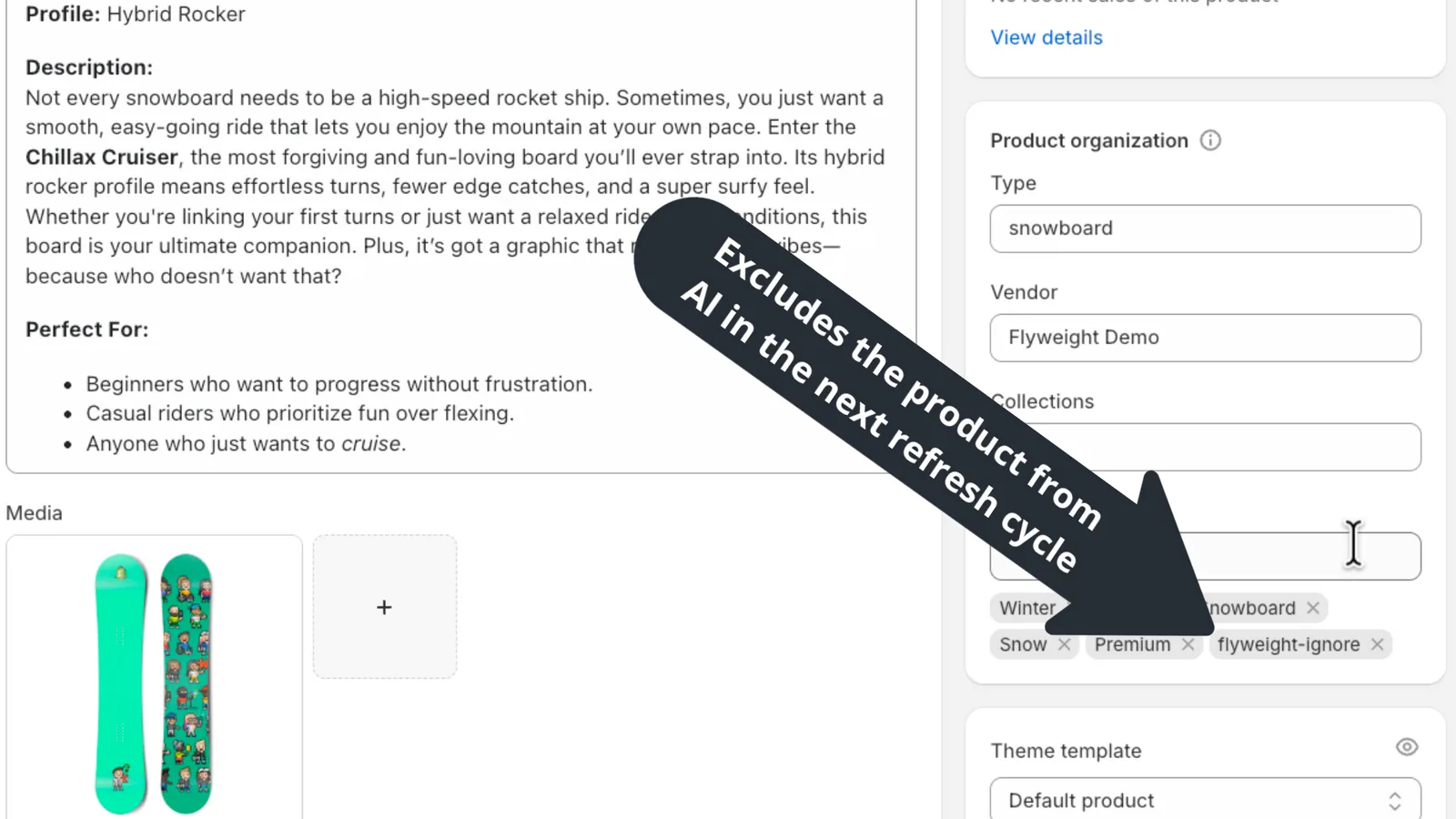
The flyweight-ignore tag works the same way as the HTML comment <!--flyweight:ignore-->.
After the next refresh cycle, the product will:
- Stop showing up in chat recommendations
- Stop being used as a knowledge source
- Be removed from the AI backend
Important: Changes Don't Take Effect Immediately
Just like when adding knowledge, the same rule applies here:
All changes are picked up during the next 24-hour refresh.
That means:
- Content is not excluded right away
- The change will be active within 24 hours
Pro Tip
If you're creating a new product that should not be used by the AI chat:
- Add the
flyweight-ignoretag when you create it - Or insert the
<!--flyweight:ignore-->comment right away
That way, the content doesn't get pulled into the AI system to begin with.
Best Practices for Clean AI Content Management
A strong Shopify AI chatbot starts with clean content.
Recommendations:
- Remove outdated content regularly
- Exclude test products with
flyweight-ignore - Use tags for bulk updates
- Use
<!--flyweight:ignore-->for precise control at the page level - Regularly review what content is publicly available
This helps your Flyweight AI Assistant work from relevant, up-to-date information.
Conclusion
With Flyweight AI, you stay in control of what knowledge your Shopify chatbot uses.
Summary of methods:
- Pages, blogs, FAQs →
<!--flyweight:ignore-->in HTML - Products →
flyweight-ignoretag
A well-maintained content base leads to:
- More precise answers
- Better product recommendations
- Fewer misunderstandings in chat
- Higher conversion rates
If you have questions or need help, feel free to reach out anytime.
We're happy to help you get more out of your AI Assistant 🚀

 Ice Barrel
 STAY SPICED !
 Australian Bodycare
 Pullup & Dip
 Venen Engel
 VEYNOU